
Every fault. Every centre.
Fully under control.
The end-to-end facilities management platform for Presbyterian Community Services. Report faults, dispatch work orders, track SLAs, manage vendors and approve spend, across every service centre. Built by AS United.
Operations overview
Today · across all sites
43
Open faults
14
Vendor assigned
11
Acknowledged
25
Closed
Open faults by trade
Live preview · sample data
10
Service Centres
6
User Roles
22
Modules
100%
Digital & Paperless
Why FRS
The old way vs the FRS way
Still juggling WhatsApp, paper job sheets, and spreadsheets?
The old way
- Faults reported over WhatsApp and lost in chat history
- No visibility on which jobs are breaching SLA
- Approvals chased over email and phone calls
- Vendor quotes and invoices in scattered PDFs
- No single record of what happened on each site
The FRS way
- Every fault logged, triaged, and tracked to close
- Live SLA timers with automatic escalation
- Tiered approvals routed by value, in-app
- Vendor portal for quotes, jobs, and invoices
- Full audit trail per site, block, and asset
Features
Built for estate operations, not generic software
Every capability is purpose-built for facilities teams — from fault reporting to tiered approvals and vendor delivery.
Fault Lifecycle Management
Report, triage, assign, and close faults across every estate. Photos, location, priority, and a complete audit trail on each case.
Work Orders & Jobs
Turn accepted faults into tracked jobs with assigned crews, schedules, and live status from start to sign-off.
SLA Tracking & Escalation
Response and rectification timers on every case. Routing rules and automatic escalation keep nothing past due.
Tiered Approval Workflows
Quotations, purchase orders, and invoices routed by value — Facilities Managers approve under SGD 5k, Management Admin above.
Vendor & Contractor Portal
Jobs are auto-assigned to the right vendor, who acknowledges, submits quotes and completions, and raises invoices — all in one shared workspace.
Multi-Site Floor Plans
Interactive 2D/3D floor plans across blocks, floors, and zones, with QR-code check-ins that pin faults to exact locations.
E-Safety & Safety Forms
Digital permits, toolbox meetings, and safety checklists captured on-site and stored against each job.
Scheduling & Preventive Maintenance
Plan recurring servicing and inspections, assign crews, and keep every site ahead of breakdowns.
Live Dashboard & Analytics
Real-time metrics across faults, jobs, SLAs, and spend — with audit logs and exportable reports.
Inside the portal
Real screens from the facilities portal
Not mockups — the actual screens our staff and contractors use to keep every PCS centre safe and running.
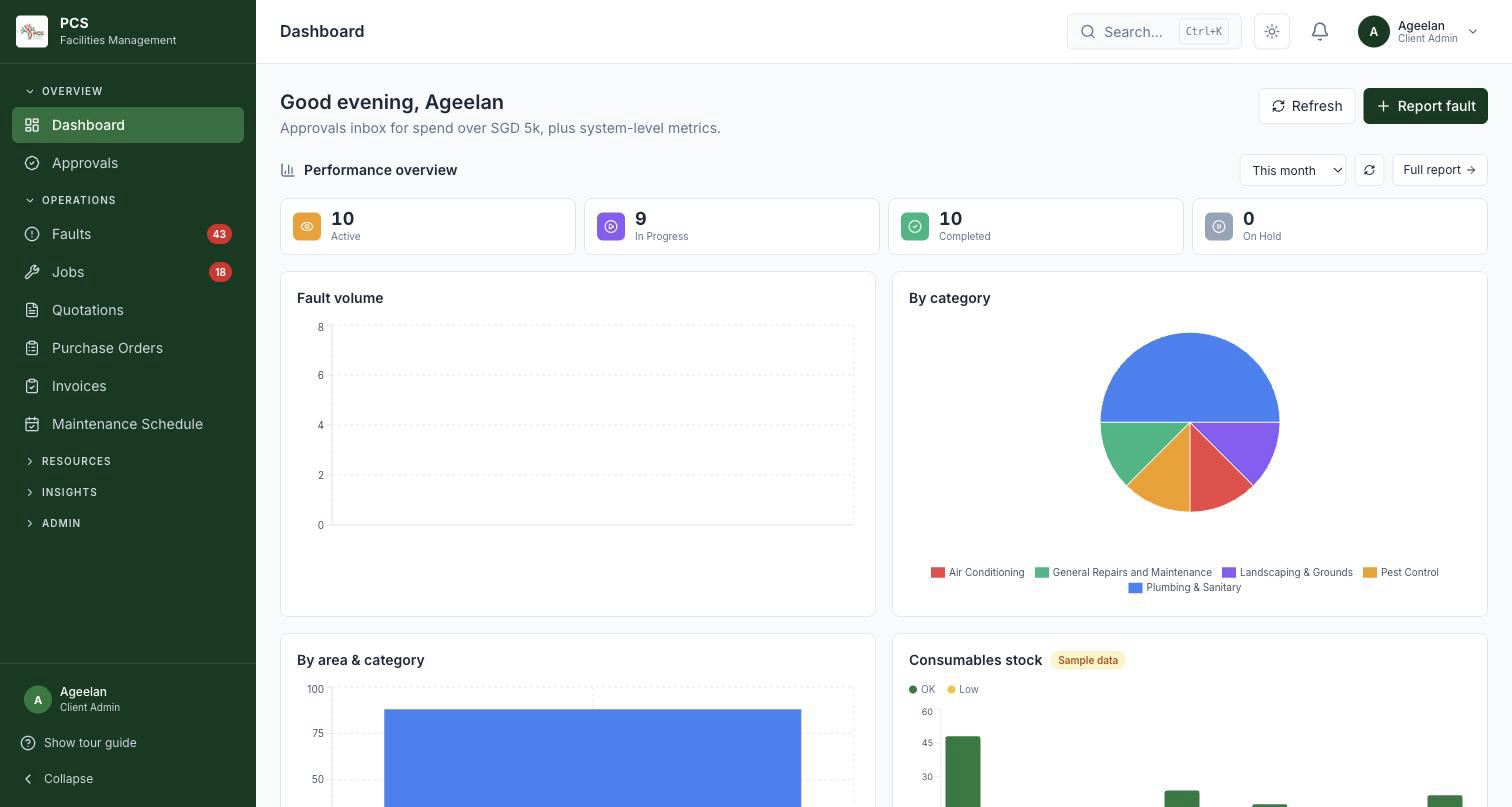
Live overview across every centre: active and in-progress work, fault volume, and the split by category.
Portal access
Every team member sees exactly what they need
Role-based access keeps officers on their cases, managers on their team, admins on oversight, and contractors on delivery — nothing more, nothing less.
PCS Admin
Full oversight- Approves spend above SGD 5k
- All analytics, audit logs & settings
- Configures SLAs & routing rules
- Vendor matching & platform config
Facilities Manager
Operations- Triages and assigns faults
- Manages vendors and jobs
- Runs tenders & purchase orders
- Approves spend under SGD 5k
FEM Officer
Field- Reports faults from centres
- Tracks their site's cases
- Uploads progress photos
- Signs off completed work
Contractor
Delivery- Acknowledges assigned jobs
- Submits quotes & completions
- Updates job status on-site
- Raises invoices
How it works
From reported fault to signed-off close
Five steps. Every case. No paper, no chasing signatures over WhatsApp.
Report the fault
An officer logs a fault with photos, location, and priority. A unique case number is generated instantly.
Triage & assign
The Facilities Manager reviews, sets the SLA, and routes the case to the right in-house team or vendor via routing rules.
Quote & approve
Vendor acknowledges and submits a quote. Approval routes automatically by value — FM under SGD 5k, Management Admin above.
Work & track
The job runs with live status, scheduling, safety forms, and progress photos — SLA timers tracking every step.
Sign-off & close
Work is verified and signed off, the invoice is processed, and the full record is archived in the audit trail.
Compliance
Compliance and accountability, built in
Every fault, job, and approval is timestamped, attributed, and permanently recorded — so the team is always audit-ready, not scrambling after the fact.
SLA timers on every case
Response and rectification deadlines tracked automatically, with escalation before they breach.
Role-based access
Every user sees only what their role allows — officers, managers, admins, and contractors.
Immutable audit trail
Every action timestamped and permanently logged — a complete record for every fault, job, and approval.
Singapore-hosted
Data hosted in Singapore, aligned to client governance and data-residency needs.
Portal modules
Everything the FM team needs, in one place
The whole facilities portal, grouped the way the team works — operations, resources, insights, and admin.
Operations
9 modulesFaults
Log, triage, and track every fault to close, with photos and a full audit trail.
Jobs
Accepted faults become tracked work orders with crews, schedules, and live status.
Quotations
Request, compare, and approve vendor quotes against each case.
Tenderboard
Open larger works to multiple vendors and award transparently.
Purchase Orders
Raise and track POs once spend is approved.
Invoices
Vendors submit invoices; finance verifies them against the job.
E-Safety
Digital permits, toolbox meetings, and safety checklists per job.
Scheduling
Plan preventive maintenance and assign crews ahead of time.
Approvals
Tiered sign-off routed by value across the team.
Resources
4 modulesVendors
Manage contractors, trades, rates, and performance.
Sites & Floor Plans
Blocks, floors, and zones with interactive 2D/3D plans and QR check-ins.
HR
Worker profiles, permit types, and deployment records.
Consumables
Track materials and supplies used across day-to-day FM work.
Insights
3 modulesAnalytics
Live metrics across faults, jobs, SLAs, and spend.
Communications
In-app messaging tied to each case and job.
Audit Log
A complete, timestamped record of every action.
Admin
6 modulesUsers
Manage accounts, roles, and permissions.
Workflows
Configure the fault-to-close process to match operations.
Safety Forms
Define the safety documents required per job type.
SLA Config
Set response and rectification targets by priority.
Routing Rules
Auto-route cases to the right team or vendor.
Settings
Platform-wide configuration.